
Technical guide
How to back up specific folders on a Mac
To back up one folder with Azivault, create a plan, choose that folder as the source, choose a separate destination, finish the schedule and encryption steps, then select Run Now. Each plan protects one source folder and everything included beneath it.
Last technically reviewed: .
Scope and disclosure. Azivault is designed around one selected source folder per backup plan. This guide explains that model honestly, including when whole-Mac Time Machine backup or a cloning tool is the better fit.
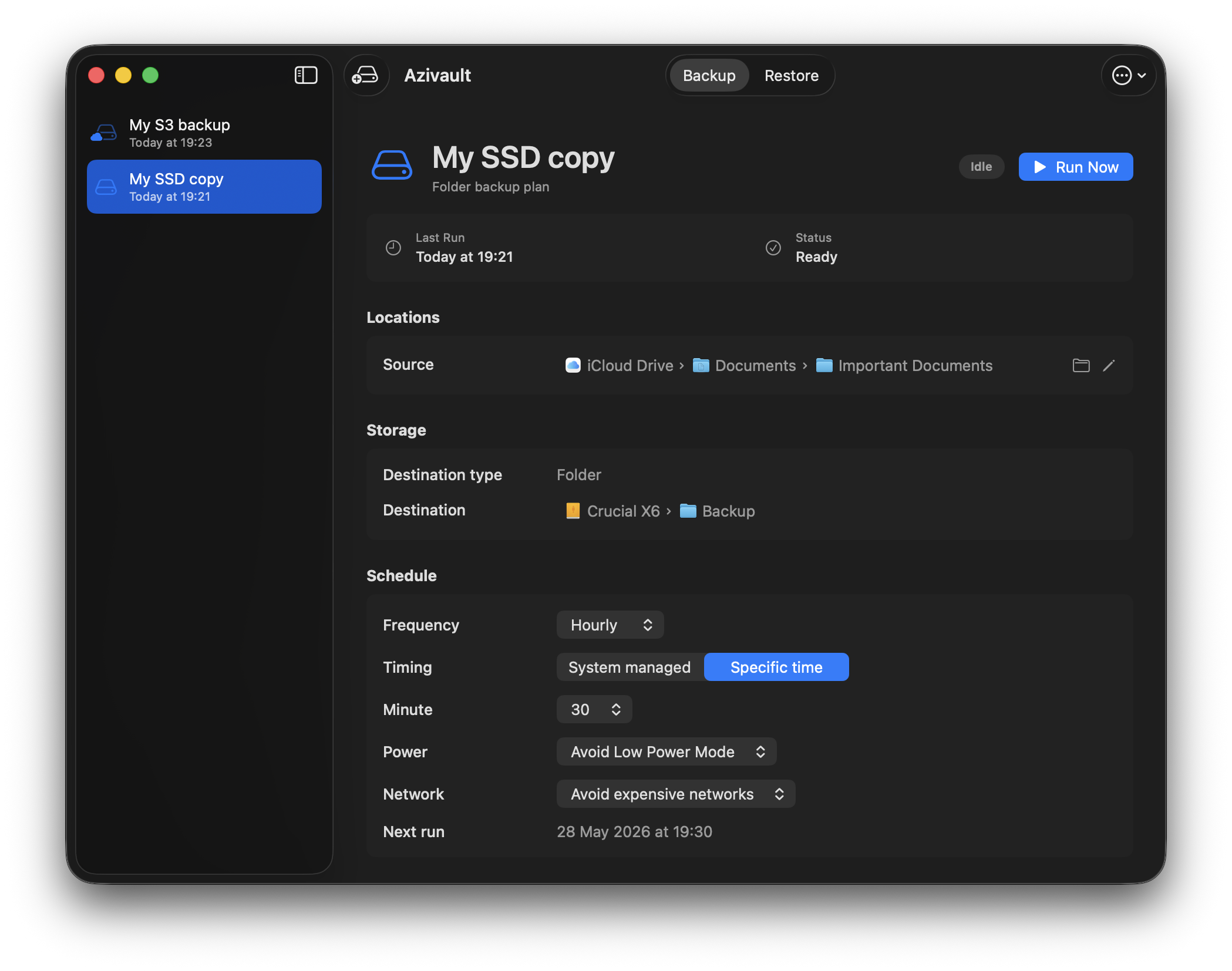
Back up one folder step by step
- Open Azivault and choose Create New Plan.
- In Source, choose the folder you want to back up. Give the plan a name that will still make sense during recovery.
- Review Exclusions. Keep a file or subfolder out only when you know it is disposable or protected elsewhere.
- In Storage, choose a different folder or S3 compatible destination. Azivault prevents the backup repository from overlapping the source folder.
- Choose a schedule. Manual backups are free; the schedule becomes active during a trial or with monthly, yearly, or lifetime access.
- Create and confirm the recovery password, decide whether to save recovery access in iCloud Keychain, then review the plan and choose Add Plan.
- Select the new plan and choose Run Now. After it completes, open Restore and copy a test file to a temporary folder.
Create another plan when a second folder needs a different destination, schedule, exclusion policy, or recovery boundary. Selecting the nearest useful parent folder is usually easier to operate than maintaining many overlapping plans.
Quick recommendation
- Choose recoverable units: protect folders that make sense when restored together, such as a project, archive, document set, or media library.
- Separate policies: use different plans when folders need different schedules, destinations, or cloud-only-file behavior.
- Keep whole-Mac recovery: selected folders do not replace Migration Assistant, applications, settings, or operating-system recovery.
- Test one folder: restore into a temporary location and verify names, hierarchy, bytes, and application readability.
When selected-folder backup is the right model
Selected-folder backup works well when a bounded set contains the durable value: client work, source code, research, writing, accounting exports, photographs, or an archive. Scope is explicit, storage is easier to estimate, and recovery does not depend on reconstructing an entire machine image.
Use Time Machine or Migration Assistant when you need applications, user accounts, settings, and broad Mac state. Use a cloning or copy tool when you need the destination to remain a directly readable mirror. These are different recovery promises.
Inventory files before choosing folders
Start from consequences: what would stop work, cost money, or be impossible to recreate? Then locate the authoritative folder. Avoid backing up only an export when the editable source lives elsewhere, or only a sync placeholder when the provider owns the current bytes.
- Include original work, not just previews or generated exports.
- Include small metadata or project files required to interpret larger assets.
- Exclude build output, caches, installers, and reproducible dependencies unless restore speed justifies them.
- Document files outside the selected folder that the same workflow needs.
Use plan boundaries intentionally
In Azivault, one plan protects one selected source folder. Use separate plans to run a small critical folder more often, store a large archive on cheaper storage, or keep client data on a different destination.
Do not create dozens of tiny plans without an operational reason. Every plan adds schedule state, destination access, recovery material, monitoring, and another restore path to test.
Avoid nested and duplicate coverage
If one plan protects a parent folder and another protects a child folder, the same content may appear in two repository histories. That can be intentional for a high-value subset, but verify the overlap before you rely on the plans.
Content addressing can avoid rewriting identical payloads inside one repository contract, but separate repositories or providers do not magically share deduplication. Treat their storage and retention independently.
Handle cloud-synced folders explicitly
A selected iCloud Drive or other file-provider folder may contain a mix of local files and dataless placeholders. Azivault’s new-plan default compares placeholder metadata with the previous catalog, downloads only new or changed cloud-only content from the live path, and reuses the previous object for unchanged files.
If a provider cannot materialize a required file, the item is reported without erasing the previously backed-up version. Skipping cloud-only files is also available, but it means the repository is not a complete independent copy of the selected folder.
Choose destination and schedule per folder
A frequently changing project may need daily or system-managed runs to offsite storage. A large archive may need a less frequent schedule and a local or lower-cost destination. Base the schedule on acceptable data loss, not merely convenience.
Scheduled folder access on macOS requires the helper’s security-scoped bookmark to remain valid. Network volumes, removable disks, provider sessions, power, and paid automation access can all affect whether due work starts.
Restore without overwriting good files
Reveal a completed run in Finder and copy the selected folder or files to a temporary destination first. Compare the restored version with the current folder before replacing anything. This is particularly important after synchronization damage or ransomware, where current names may look normal while contents are wrong.
Selected-folder backup limitations
Azivault does not reinstall macOS, applications, login sessions, system settings, device-management profiles, or every hidden application-support dependency. A folder-level repository is deliberately smaller and more portable, but you must decide what belongs inside its boundary.
Sources and related technical reading
- Apple: Back up files with Time Machine
- Cloud backup for Mac
- Restore files from a Mac backup
- Azivault repository design
FAQs
Can Time Machine back up only one folder?
Time Machine is designed as broad Mac backup with exclusions. A plan-oriented tool is clearer when one selected folder is the explicit backup unit.
Can Azivault back up my whole Mac?
Azivault backs up selected folders. It does not provide whole-system migration or operating-system recovery.
Should every folder use the same destination?
No. Separate plans can use different local, network, or S3-compatible destinations when risk, cost, and schedule requirements differ.
What happens to cloud-only files?
The policy can report them, skip them, or download changed content. New Azivault plans default to downloading only new or changed cloud-only files.